



The increase in internet usage has occurred due to the proliferation of apps. At the same time, this growth in mobile app usage has also raised a lot of app security questions, which is the next big challenge that all businesses are facing today.
By 2021, the app market is projected to grow to a USD 189 Billion industry, growing at a rate of 270% approximately.
It is a prime discussion in any business, how we can implement a better app security, keys of which are tied to the development of the application.

What are the best app security features your website needs?
So, what separates the pretenders from the legitimate, built-for-business software? Architecture and security. The cheap amateur software focuses mainly on the look and feel but skimps on the architecture and security.
App development software that’s truly designed for business will include flexible architecture and business-class security features, which are discussed one by one.
 Application level security
 This security feature lets you control the application access on a per-user/per-user basis role & also overall application basis such as the use of keychain in the iOS to store all credentials, valid SSL, JWT certificates for your website URL. It typically includes a role-based menu system, which displays different options to different users based on their role.
Importance: Unless every employee in your organization should have access to every application, application-level security is a must-have. For example, your CEO might have access to all applications, while your HR department can only access applications related to HR.
Single sign-on
Single sign-on (SSO) is a session/user authentication is a centralized & linked process that lets users enter their name and password in only once & access multiple related applications. It authenticates the user for all the applications they’re authorized to access & eliminates login prompts when switching between the applications in a single session.
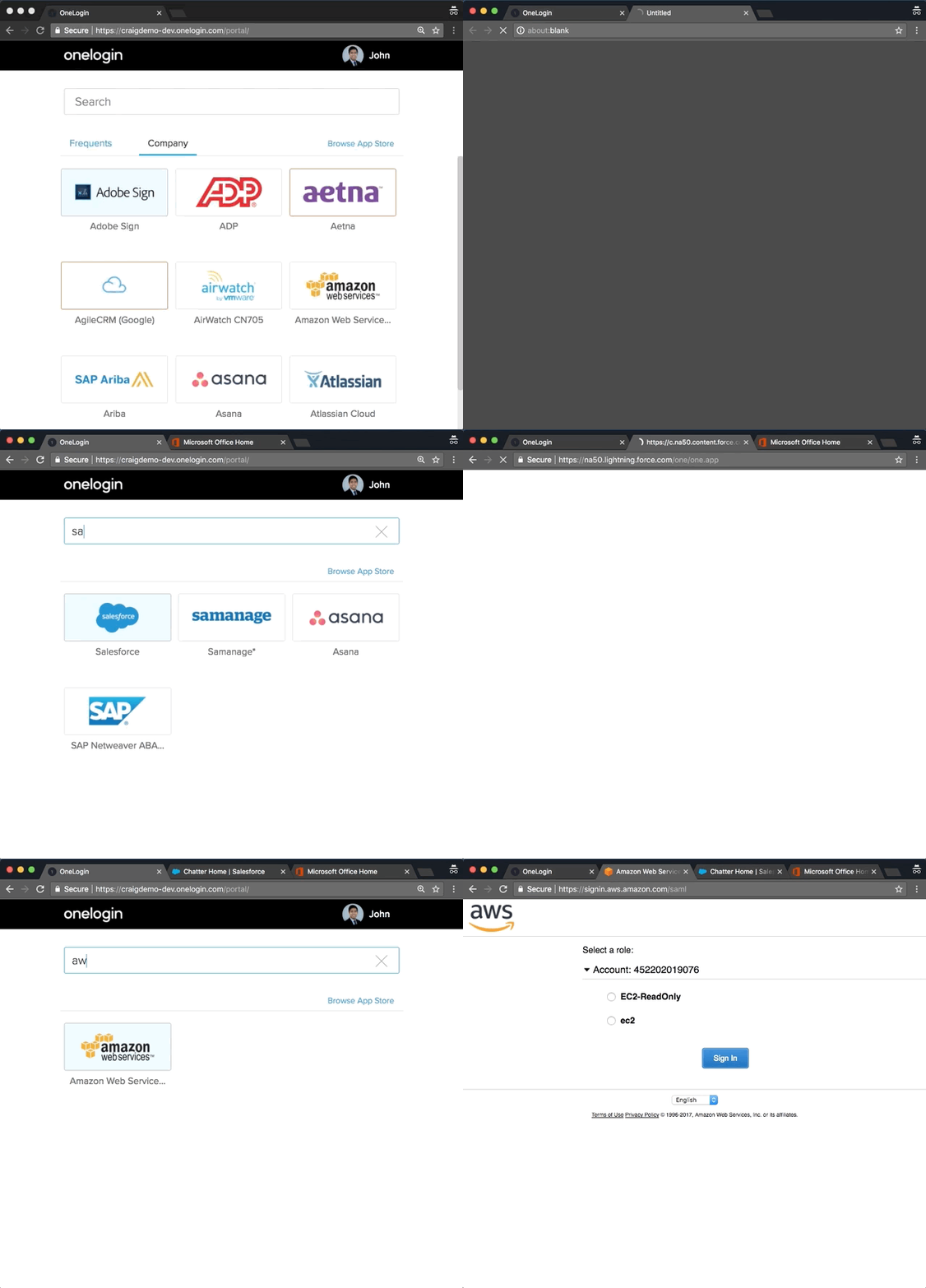
Importance: SSO reduces the number of passwords end user must remember and cuts down on “forgotten password” support requests. It also improves the end user productivity as the user no longer require to log in to each new application, which is otherwise linked together. For example, most of the applications now accept either facebook/twitter/email login such that you can access multiple applications at a time while logged in just once.
User privilege parameters
User privilege parameters are used to personalize features and security to individual users or user roles. These user privilege parameters are saved to a user’s profile and accessible throughout every application.
Importance: User privilege parameters are incredibly flexible. They can control an application’s look and feel, add or hide user options, limit user capabilities, and more. For example, suppose your company had a customer listing application.
User privilege parameters could be set to display an “Update Customer Info” button only when accessed by a manager. While all other employees could access the same app, only managers could see the option to update data.
Flexible authentication options
 Many businesses already use multiple application authentication sources. For example, your CRM system might authenticate users against one user table, while your email system might use a completely different authentication source.
Business-focused application development software should offer flexible authentication options–letting you authenticate your applications using your choice authentication sources you already have in place.
Importance: This means you don’t need to change your current authentication methods or create & maintain yet another user table. It lets you take advantage of the authentication methods you already use.
Row-level (or multi-tenant) security
 A critical aspect of B2B, BI, & reporting applications, multi-tenant security lets you control data access within a single application at the row-level. This means that multiple users can access the same application, but can only view the data they’re authorized to see.
Importance: As mentioned above, different users/user groups must have varying levels of data access. For example, suppose you need to build a sales report, but each salesperson should only have access to his/her sales figures.
Rather than building separate applications for each user, multi-tenant security lets you create one application that displays different data applicable to each user role. For example, the same OLA app has different views depending on each customers account & the value-added/paid services he has subscribed for.
User-specific data sources
This security feature is similar to row-level security but on a database level. It means you can build a single application that accesses different data sources depending on the user.
Importance: This security feature provides flexibility, as it lets developers dictate which database each user can access. For example, suppose two companies are merging. While employees from each company must now use the same application, employees from Company A might need access to a local database, while employees from Company B might need access to data from a completely different database. With user-specific data sources, the application will point to the correct database based on the user.
Application activity auditing
Application activity auditing lets developers log end-user activity for signin/signoff activities. This lets IT departments quickly see when a user has logged in, which application they accessed, and when they have logged off.
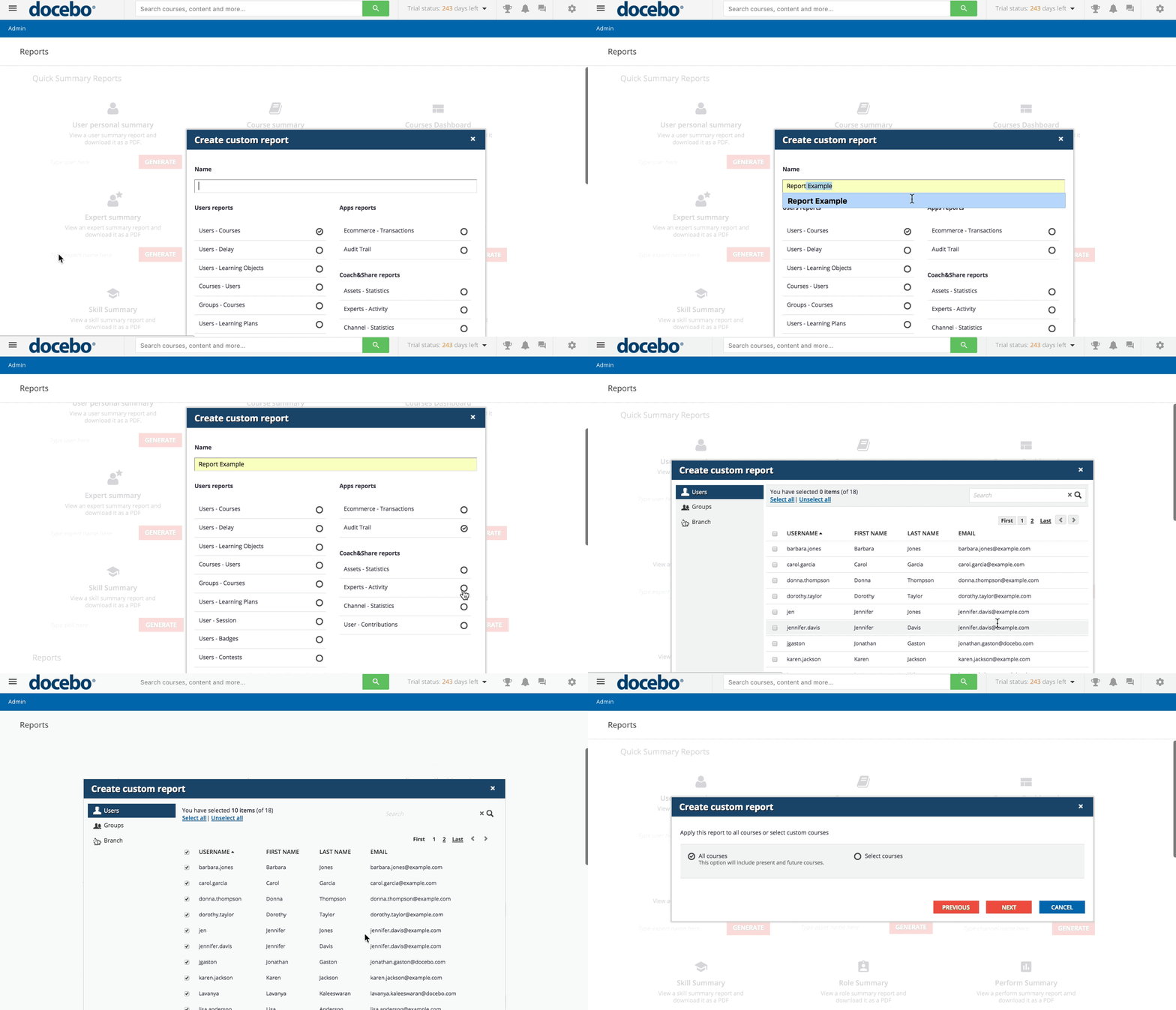
Importance: When managing application security, it’s quite useful to know who is logged in to your system. On a non-security note, activity auditing analytics also help your company to understand which applications are being used and which are being ignored.
What is the importance of mobile app security?
Mobile apps are largely considered unsecured because they need continuous internet connectivity. This is heightened by the fact that many users try installing apps from unreliable sources, thereby inviting malware & hampering the security of other apps on the device as well.
Report by Alcatel-Lucent’s Motive Security Labs depicts, an estimated 16 million mobile devices worldwide have been infected by malware.
This trend, therefore, points to a future where mobile security is of utmost importance. As identity thefts and credit card hack become more commonplace, certain security measures need to be implemented so as to ensure strict user confidentiality and overall security.
What are the best mobile app security features?
Security is not confined to only desktop applications, but also Mobile app security is important these days. So, talking about Mobile App Security here is the checklist, that needs to be considered by developers & businesses before progressing with mobile development.
 Optimize Security Features Platform-by-platform Basis: Mobile apps work on various platforms, devices, operating systems, and networks. These apps also access a lot of other features of the phone which can be optimized by the use of proguard on Android. The developers should be cautious about the features, capabilities, and limitations of various devices, operating systems and so on.
 Strong Hack-proof Code: Mobile apps are highly vulnerable to malware attacks and data breaches and this mandates that developers pay extra attention to write a robust code that is free from backdoors which in turn could be infringed by hackers. App developers must implement mobile app security standards such as the use of Keychain authentication & make sure that their apps utilize, transmit, or store bare minimum data.
 Select a Reliable Backend: Security of backend systems is also important while developing mobile apps. Hackers can gain access to the backend systems and pose a threat to your entire operation. Therefore, just like the frontend systems, backend systems should also go through rigorous security testing before eventual deployment.
 Remove Unnecessary Security Risks: Each mobile app has its own set of features. Some features might not be so vital to the overall functioning of the app, for example – social network connectivity. The designers and developers of mobile applications should pay special attention to such features and take a call whether they need to keep them within the app or not.
 Allow User Permissions For granular control over the app, mobile app developers can make their devices more secure by implementing security measures at the application layer. This allows users to select their own level of security settings based on personal preferences and keep their devices safe from malicious applications.
 Ensure Data Security during Transit and Storage: The biggest challenge posed to mobile app security is that mobile apps have to connect with external networks. They connect to the internet via Wi-Fi, cellular networks, VPN, non-encrypted networks, and so on. This has to be given special consideration by developers and precautions should be taken to encrypt data during transit. All the critical user information like login details, passwords, personal info should be encrypted.
 Choose Third-party Libraries Wisely: Third-party libraries are highly popular amongst mobile app developers. They utilize the code offered in such libraries, but threats might lurk in that code. It is advisable to thoroughly test the codes taken from third-party libraries before incorporating it with your own mobile app code since many might have malicious code lurking around.
 Use the Latest Cryptography Techniques: Most widely used cryptographic protocols and algorithms such as MD5 and SHA1 are insufficient as per modern security standards. Therefore it is better to use state-of-the-art encryption APIs such as 256-bit AES encryption combined with SHA-256 for hashing. As a developer, you should also invest in threat modeling, penetration testing, etc.
 Deploy Tamper-detection Techniques: Deploy anti-tamper & tamper-detecting techniques that minimize code tampering, such as verifying the app’s signature at runtime, identifying app installer, performing environment checks, reverse proxy setup on the load balancer, etc. It is commonly known that attackers insert malicious code into mobile apps and then automatically get the data and publish it elsewhere.
 Test Thoroughly: Probably the most important security check you can perform is by thoroughly testing the app. This is because the application goes through a lot of hands and different versions during the development and post-production. Mobile app security testing should be the priority at every stage of development. Also make sure that your app is designed as per the security regulations listed by the credit card industry, GPS, device manufacturers, etc.
Recommendation
In order to avoid such development complexity, time & cost of the development & shorter time to market, the best option is to build your application with a ready-made software solution.
These solution providers also ensure application support, which means, you need not break your head to fix a security issue, they will take care of your overall application development, security & maintenance.
Want to build a highly secured application for your business? Click Here